


How to Order Embroidery Digitizing Services
If you are searching for “embroidery digitizing services” or “embroiderers near me,” you likely need a reliable way to convert your artwork into a stitch-ready embroidery file. Most local shops only provide stitching, while professional digitizing is what prepares your design for machine embroidery.
At Fineline Digitizing, we’ve been doing exactly that for 15 years. Our team has completed hundreds of digitizing orders for shops, brands, and individuals across the country, backed by a 4.9 out of 5 average rating across more than 1,000 completed orders. That track record is the whole reason this process works as smoothly as it does.
You don’t need to learn embroidery software or touch any technical tools yourself. Upload your design, choose your preferences, and you’ll get professionally prepared files through a secure dashboard with full order tracking, start to finish.
What Is Embroidery Digitizing?
Embroidery digitizing is the process of converting artwork, logos, or illustrations into a machine-readable stitch file that embroidery machines can run. That file controls everything happening behind the scenes:
- Stitch type and direction
- Stitch density and sequence
- Thread path and structure
- Stitching order and flow
Skip this step, or get it wrong, and even a great embroidery machine ends up producing puckered fabric, broken threads, or fine details that just turn into a blob of stitching. Proper digitizing is what actually prevents that. It’s the difference between a design that looks good on screen and one that looks just as good once it’s stitched onto fabric.
Who Uses Our Embroidery Digitizing Services?
We work with a wide range of people, including:
- Embroidery shops and production businesses
- Fashion and apparel brands
- Uniform suppliers, corporate, sports teams, and schools alike
- Etsy sellers and print-on-demand stores
- Individuals who just need one custom design done right
We’ve digitized pretty much everything you can imagine across these groups, from single logo orders to large uniform batches. One recent project involved digitizing a 200-piece uniform order for a regional school district, every placement, every size, delivered on schedule without a single reprint. That’s the kind of result we aim for on every order, big or small.
Browse our embroidery digitizing portfolio to see examples across logos, apparel, and uniform work.
How Our Ordering System Works
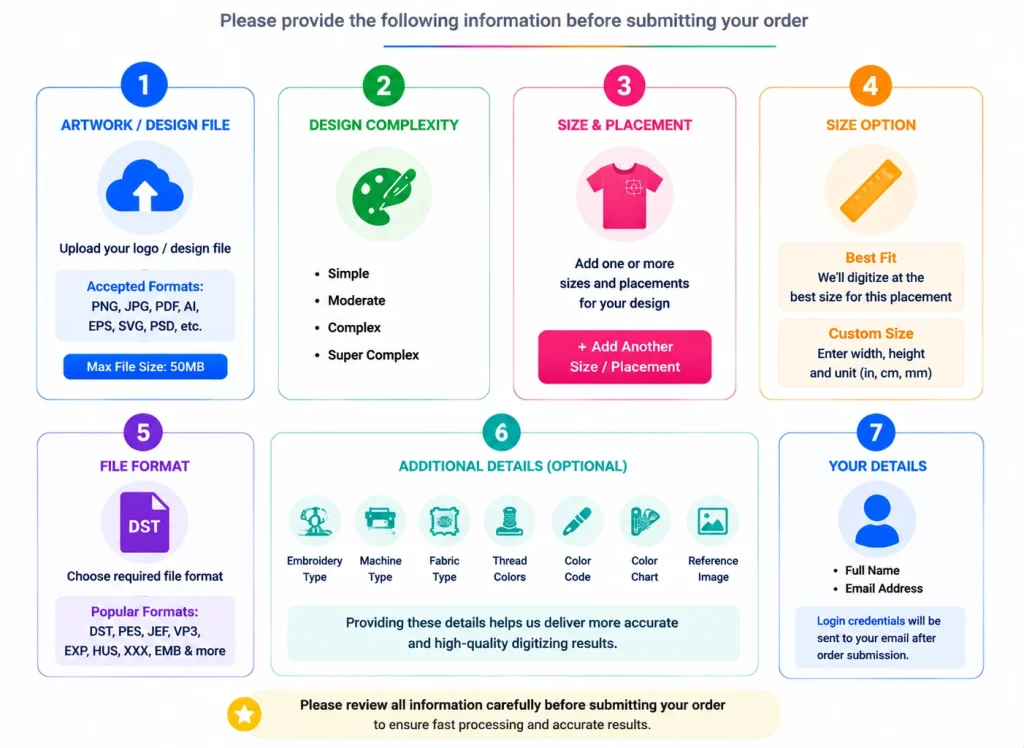
We built this to be simple and fast, with no confusing steps and nothing hidden in fine print.
1. Choose Your Order Type for Embroidery Digitizing
Instant Order (Place Order)
Best for standard designs that need quick turnaround. Pricing gets calculated automatically based on:
- Design complexity
- Size and placement
- Number of variations
- Turnaround time
Your order moves into production right away. Once digitizing is done, a PDF preview shows up in your dashboard so you can check the quality yourself before paying anything. Approve it and complete payment, and your DST, PES, and other machine-ready files unlock for download right away. Check our pricing page for a sense of typical costs before you start.
Request Quote (Manual Review)
Best for complex or detailed designs that need a closer look. Our digitizing specialists review your artwork by hand and send a custom quote before production begins, so pricing stays fair and accurate for what you actually need.
2. Upload Your Artwork
We accept PNG, JPG, PDF, AI, EPS, PSD, and SVG files, up to 50MB.
3. Select Design Complexity
Pick whichever category fits best: Simple, Moderate, Complex, or Highly Complex. This keeps pricing accurate and helps our team plan the stitching properly from the start.
4. Define Size and Placement
You can add multiple placements to a single order. For example:
- Left chest, 3 inches
- Cap front, 2.5 inches
- Jacket back, 10 inches
Each placement gets processed as its own machine-ready file, so quality holds steady no matter how many variations you add. Curious what a finished file actually looks like for a specific technique? Our puff embroidery and applique digitizing pages break those down in more detail.
5. Choose a Sizing Method
- Best Fit (Recommended): sizing gets optimized automatically
- Custom Size: enter your own exact dimensions
6. Add a Few Optional Details
These aren’t required, but they genuinely help:
- Embroidery style (flat, 3D puff, applique, patch, and more)
- Machine brand (Tajima, Brother, Ricoma, others)
- Fabric type (cotton, polyester, denim, etc.)
- Thread colors and color codes
- Number of colors
- Reference images or notes about the artwork
The more we know going in, the more accurate your first file usually comes out.
7. Submit Your Order
Enter your name and email to finish up. Once you submit, your account gets created automatically, your login details land in your inbox, and you can start tracking your order right away. Everything runs through an encrypted system, so your files and information stay private.
Before committing to any production run, test the file on the exact fabric and backing combination you will use. A test run takes 15 minutes. Fixing a problem discovered on piece 200 of 500 takes considerably long
Your Dashboard Experience
Once you’re logged in, you get full visibility into your order at every stage.
Order tracking includes:
- Order ID and payment status
- Live production progress
- File preview and download section
- Revision history
- Support ticket system
Order Workflow
Every order moves through the same structured pipeline:
Order Placed → Confirmed → In Production → Quality Check → Ready → Delivered → Completed
That structure is what keeps quality consistent across every single order, not just the easy ones.
File Delivery and Compatibility
Once digitizing is complete, a PDF preview lands in your dashboard first, so you can check the design’s quality before paying anything. Once you approve it and complete payment, your machine-ready files unlock for download. You’ll receive:
- DST file (the industry standard embroidery format)
- PES file (Brother machine format)
- PDF preview so you can check the design before stitching
Need something else? JEF, VP3, EXP, HUS, XXX, and EMB formats are all available on request. Every file is optimized for smooth stitching, not just technically correct on paper.
Quality Assurance and Revisions
Every design goes through a manual quality inspection before it ever reaches your dashboard. We’re checking for clean stitch flow, accuracy, and whether it’s genuinely production ready.
If something still needs adjusting:
- Submit a revision request through your dashboard
- Describe the changes clearly
- Our digitizing team reviews and updates the file
- The revised version gets delivered back to your account
Revision support is included with every order. After years of doing this and thousands of files, we’ve learned that getting revisions right matters just as much as getting the first file right.
Turnaround Time
Most digitizing orders are completed within 02 to 48 hours, depending on how complex the design is.
Why Choose Online Embroidery Digitizing?
Instead of searching for local “embroiderers near me,” ordering online gets you:
- Faster turnaround than most local shops can offer
- A more cost-effective workflow overall
- Consistent quality backed by years of hands-on experience
- The ability to order from anywhere, no location required
- Zero need to buy or learn digitizing software yourself
- A PDF preview to check quality before you ever pay
It’s all handled through one secure, automated system from upload to download.
Platform Features at a Glance
- Instant pricing for standard orders
- Manual quote option for complex designs
- Multi-placement order support
- Multiple images supported under a single order
- PDF preview available before payment, machine files unlock after
- Real-time tracking dashboard
- Automatic account creation
- Secure, encrypted file delivery
- Manual quality control on every order
- A real revision process built into every order
- Live chat and order-specific support tickets
Ffrequently ASKed Questions (FAQ)
Everythig you need to know about order placement at Fineline Digitizing
Do I need my own embroidery digitizing software?
No. That is the entire point of using FineLine Digitizing. We handle the full digitizing process for you, so you do not need to buy, learn, or use embroidery digitizing software yourself.
Can I add more than one placement to a single order?
Yes, there is no limit to the number of you that you can add.
Which file formats do you deliver?
It will include DST by default (and PDF preview). If you require a different format for your particular embroidery machine, you can choose this at the time of ordering or get in touch with our support team via your embroidery machine dashboard and we will do our best to provide you the format you need.
How can I avoid delays once I have placed my order?
To minimize delay, fill in the optional fields before order placement particularly the machine type, fabric type, fabric size, placement and instructions. The more information we can have in front of us the less back and forth we will have to do to get your file set up correctly the first time.
What if I do not know which file format my machine needs?
Just fill in the machine type field when placing your order. As long as we know which machine you are using — such as Tajima, Brother, Ricoma, or another brand — we can help provide the correct machine file.
What happens if I am not satisfied with my delivered order?
If you are not satisfied, contact us through live chat and submit a revision request from your dashboard. We treat revision requests seriously and work to correct the issue as quickly as possible.
If we are unable to resolve the issue according to the order requirements, we will review the case and offer the appropriate solution based on our revision and refund policy.
When do I actually get charged for my order?
Once your design is digitized, you will receive a PDF preview in your dashboard so you can check the quality first. Once you are satisfied and complete payment, your machine-ready file unlocks immediately for download.
Can I upload more than one image in a single order?
Yes. If you already have a logo, photo, mockup or several different versions of your design, you can upload it all in one order rather than filing multiple orders.
What if I do not agree with the automatic pricing on my order?
No problem. You can switch to Request Quote at any point without having to redo your order details. Your design, placements, and preferences carry over automatically, and our team will review the order manually before confirming the final price.
How do I get my files once they're done?
They land in your secure dashboard, and you’ll get an email the moment they’re ready.
Ready to Get Your Design Digitized?
Most orders go from upload to a finished, stitch-ready file in 2 to 48 hours, no back and forth, no guesswork on your end. Drop in your artwork, pick your placements, and let our team handle the part that actually requires the experience.